 TierMux
 documentation
Introduction
TierMux is three things built on one dataset: a verified catalog of free-tier LLM providers and models, a free agentic coding assistant for VS Code, and a self-hosted gateway that serves inference from your own keys on your own infrastructure.
Every provider in the catalog has been verified with real requests. Capability flags — tool calling, image input, reasoning — are measured, not copied from a pricing page, and listings that stop answering are removed rather than left to fail silently. The catalog reflects what is callable today, not what was callable when it was indexed.
The API is read-only, needs no account and no key, and sends Access-Control-Allow-Origin: * on every response, so a browser can call it directly.
Quick start
Three entry points, depending on what you came for.
Code in your editor#
- Install the extension. In VS Code: Extensions (Ctrl Shift X) → search TierMux → Install. In Cursor, Windsurf, Antigravity, VSCodium or Trae, take the same build from Open VSX.
- Open it. Activity Bar → TierMux.
- Type. Four providers ship keyless, so the first message answers with no key, no account and no config.
That is the whole setup. Adding free keys comes later and is the single biggest upgrade you can make.
Read the catalog#
Every free reasoning model currently in the catalog, in three languages:
curl -s "https://tiermux.mainulislam3057.workers.dev/models?tag=frontier" \
   | jq '.models[] | select(.pricing.free) | .model_id'
const res = await fetch(
   "https://tiermux.mainulislam3057.workers.dev/models?tag=frontier"
);
const { models, version, last_updated } = await res.json();

const free = models.filter((m) => m.pricing.free);
console.log(`${free.length} free frontier models (catalog ${version}, ${last_updated})`);
import json, urllib.request

url = "https://tiermux.mainulislam3057.workers.dev/models?tag=frontier"
with urllib.request.urlopen(url) as r:
    data = json.load(r)

free = [m for m in data["models"] if m["pricing"]["free"]]
print(len(free), "free frontier models", "| catalog", data["version"])
Full shapes are in the API reference and the object reference.
Run the gateway#
The gateway is in final testing and the public repo has not landed yet. This catalog already serves the exact configuration payload it consumes, so a gateway deployed on day one works against it with no extra setup. The full design is here →
Concepts
Six words that mean something specific in TierMux. Worth two minutes now.
| Term | Where | What it means |
|---|---|---|
| Catalog | everywhere | The verified list of providers and models this site publishes. Both products read it; neither of them hardcodes a model list, which is why a new free provider appears without a product update. |
| Provider | catalog | One upstream API — Groq, Google AI Studio, Cerebras, a keyless router. Identified by provider_id. A provider has a base_url and is either keyless or takes a free key you get from its own portal. |
| Model | catalog | One model on one provider. The same model name on two providers is two entries, because their context windows, limits and prices differ. That duplication is exactly what makes cross-provider failover possible. |
| Keyless | catalog, extension | A provider that answers with no key and no account. Four of them ship enabled, which is why the extension's first message works before you configure anything. |
| Chain | extension | The ordered list of model–provider pairs one turn may use. Built per message, one model per provider first, so it spans providers rather than burning one provider's whole list. |
| Auto | both | A model choice, not a mode: "you pick for me". Pin a specific model instead and the turn goes to exactly that model. Only auto triggers routing. |
VS Code extension
The editor product: install it, pick a mode, add free keys, and tune what the agent may do without asking.
VS Code extension
A free, open-source agentic coding assistant that pools 30+ free-tier providers into one self-healing surface. No subscription, no per-token bill, no TierMux server in the request path.
Install#
One VSIX runs in VS Code and every VS Code fork. The only difference is which registry your editor reads:
| Editor | Registry | How |
|---|---|---|
| VS Code | Marketplace | Extensions (Ctrl Shift X) → TierMux → Install, or from the Marketplace page ↗. |
| Cursor, Windsurf, Antigravity, VSCodium, Trae | Open VSX | Search TierMux in the editor's extension pane, or install from Open VSX ↗. |
| anything else | either | Extensions: Install from VSIX takes the downloaded file. Both registries serve the identical build. |
First run#
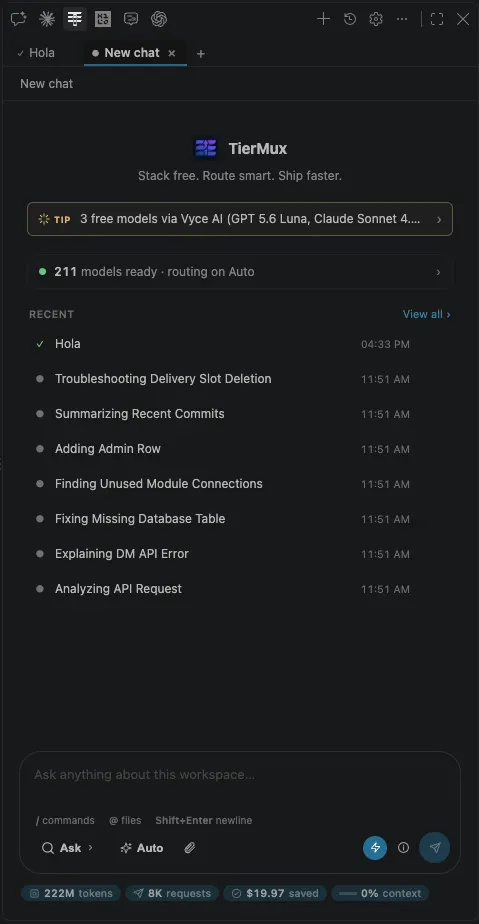
Activity Bar → TierMux, then type
That is the whole first run. The row above the composer reports how many models are ready and what routing is set to; the banner above it surfaces whatever free tier is currently worth knowing about.
- Bottom-left picks the mode: Ask · Plan · Agent.
- Next to it, the model picker — leave it on Auto, or click to pin one.
/runs a skill,@attaches a file, the paperclip adds an image.- Shift Enter is a newline; Enter sends.
- The footer counts lifetime tokens, requests, and what those turns would have cost on a paid API.
Modes and the model picker
Three modes, picked in the composer. Ask is the default.
| Mode | Writes? | What happens |
|---|---|---|
| Ask | no | Q&A only. Streams answers with strictly read-only tools — reads, greps, git log — and touches nothing. |
| Plan | no | Reads and searches read-only. runCommand is offered but every call is gated by an ask; mutating tools are absent and policy-denied. The turn ends with a structured plan card you approve, edit or reject. |
| Agent | yes | Full tool set — diffs you approve, terminal you approve, checkpoints with real undo. |
An approved plan executes as one agent turn with its steps enumerated in the prompt. Progress survives a reload — there is a Resume button.
Auto is a model choice, not a mode#
The model picker sits next to the mode picker and defaults to Auto. Auto classifies your message — chat, coding, debug, plan, agent, vision, by regex, with no model call — then builds a chain and works down it. Pin a model instead and that turn goes to exactly that model, with no routing.
How a turn is routed#
The chain is: your pinned model if there is one, else the task table's pick, then every enabled model strongest-first — one model per provider first, so the chain spans providers instead of exhausting one. Then each upstream answer is given a fixed meaning:
| The provider did this | TierMux does this |
|---|---|
| 429 | Cools that key, tries your next key, then the next provider. |
| 401 · 402 · 403 | Tries your other keys on that provider, then skips the platform for this turn. |
| 404 model removed | Next provider — and that model is skipped for 24 hours. |
| 400 with tools offered | Next provider; the pair is marked tool-incompatible for 10 minutes. |
| 5xx · timeout · headers then silence | Next provider. |
| 200 but empty | Next provider. A blank reply is not an answer. |
Providers and keys
Optional, and the highest-leverage ten minutes you can spend on the extension. More keys means more headroom before a wall; unused keys just rest.
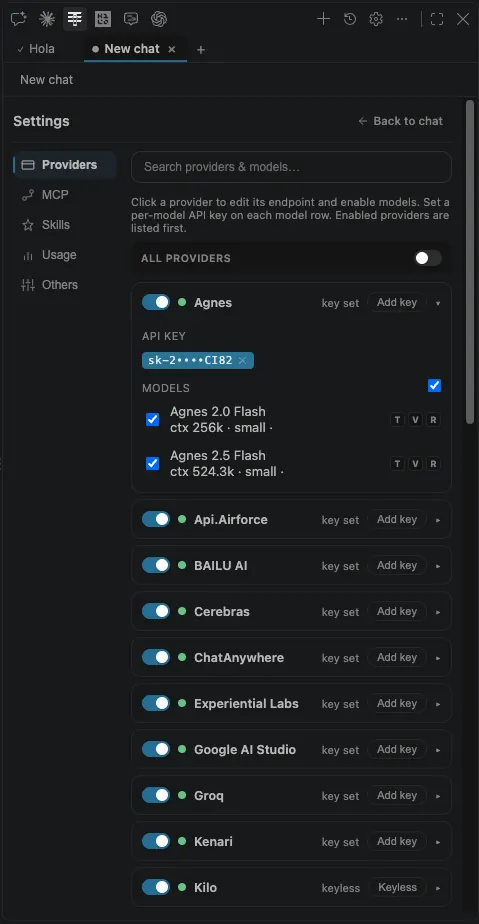
⚙ gear → Providers
Click a provider to expand it. Paste a free key, then tick only the models you want in the chain. Enabled providers sort to the top.
- The
TVRbadges on each model row mean tools, vision and reasoning — measured, not advertised. - Each model row can carry its own key, for providers that issue per-model credentials.
- Providers marked keyless need nothing at all.
- Skip this tab entirely and the keyless four still answer.
The keyless four#
Enabled out of the box, no account required: Kilo Gateway, OpenCode Zen, OVH AI Endpoints and Pollinations. This list is read from the live catalog.
Providers with a free key#
Every other provider issues free keys through its own portal. The live list, with a direct link to each portal, is in the provider directory further down this page — the get a key ↗ link in each row goes straight to the right signup.
Where keys live#
In VS Code's encrypted secret storage — not in settings.json, and not in your workspace. Requests go VS Code → provider, directly. There is no TierMux server in the path and nothing to opt out of.
MCP, skills and custom endpoints
Three more gear tabs. All optional; each one extends what a turn can reach.
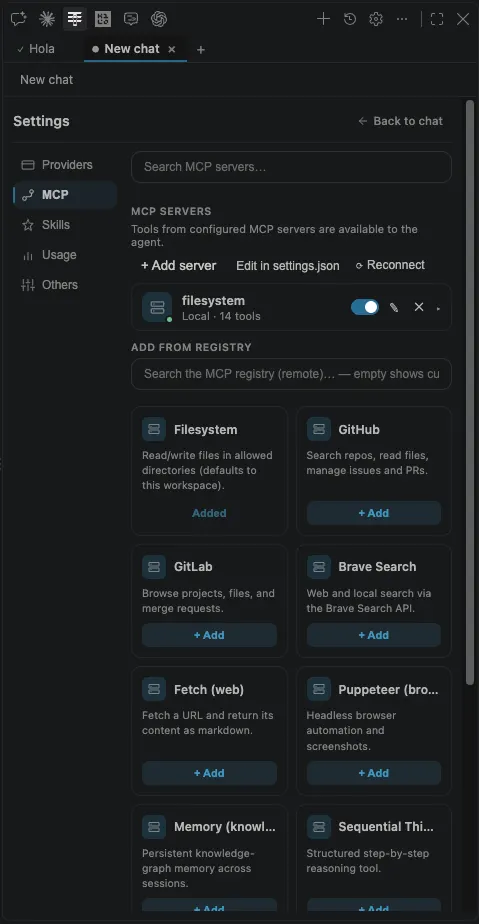
MCP servers
+ Add server, or edit tiermux.mcpServers in settings.json directly. Every tool a connected server exposes becomes an agent tool for the rest of the session.
- The registry below the list installs common servers — filesystem, GitHub, Fetch, Puppeteer — in one click.
- Remote search defaults to the official MCP registry; point
tiermux.mcpRegistrySearchUrlelsewhere, or blank it to disable remote search. TierMux: Reconnect MCP Serversre-establishes them without a window reload.
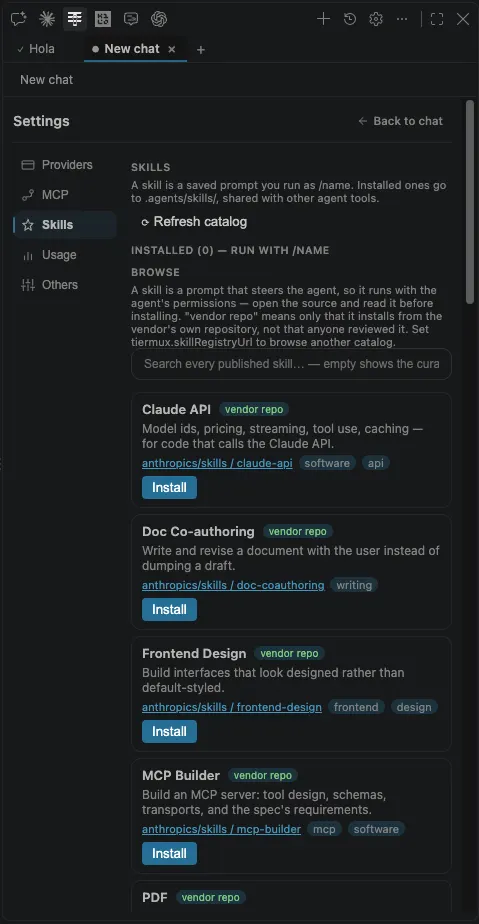
Skills
A skill is a saved prompt you run as /name. Installed ones land in .agents/skills/, the cross-tool convention, so they are shared with other agent tools in the same workspace.
- Browse the catalog, or point
tiermux.skillRegistryUrlat your own list to replace it. TierMux: Add Skill from GitHubinstalls one by URL.
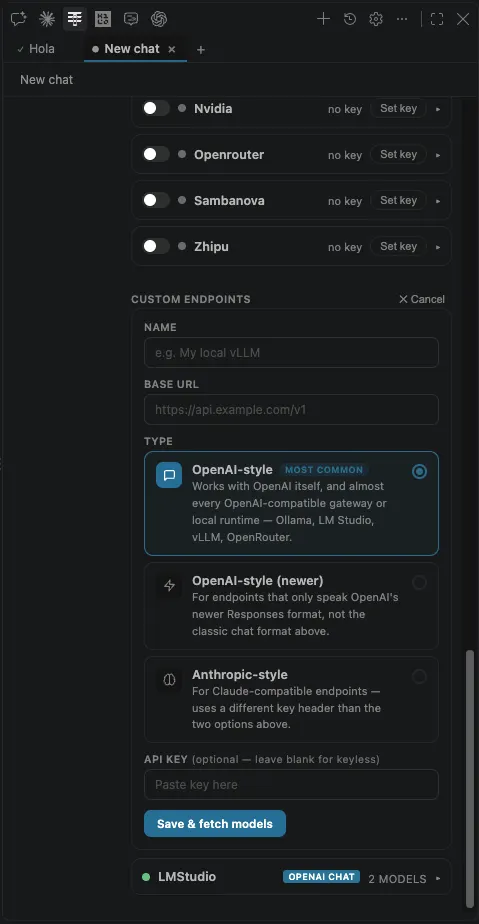
Custom endpoints
At the bottom of the Providers tab. Name, base URL, type, an optional key, then Save & fetch models.
- OpenAI-style — Ollama, LM Studio, vLLM, LiteLLM, llama.cpp, Azure OpenAI.
- Newer — the Responses API shape.
- Anthropic-style — Claude-compatible endpoints.
- Local servers are probed for their real context window rather than trusting the number they advertise.
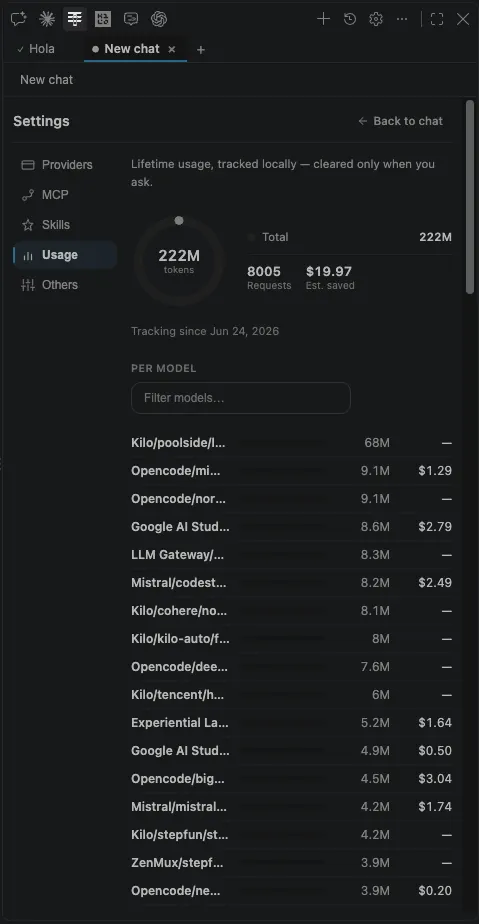
Usage
Lifetime tokens, request count and estimated money saved, broken down per model. Tracked locally on your machine and cleared only when you ask.
- Useful for the question that actually matters: which free tier are you leaning on, and what happens the day it changes?
- If one provider carries most of your traffic, that is the one to add a second key for.
Approvals and safety
The agent edits files and runs commands. What it may do without asking is yours to set, and the defaults ask.
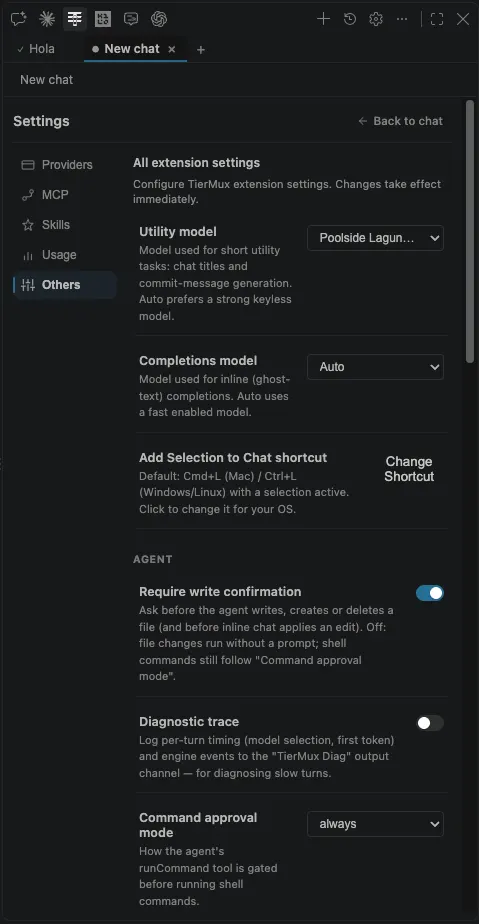
⚙ gear → Others
- Require write confirmation — a diff you approve before any file is written, created or deleted. On by default.
- Command approval —
always(ask every time, the default),allowlist(built-in safe prefixes plus your own), or off. - Utility model — the small one used for chat titles and commit messages.
- Inline completions — off by default; ghost text is a high request volume against free-tier limits.
- Diagnostic trace — turn it on when a turn feels slow and read the TierMux Diag output channel.
The rails that are not optional#
- Every path argument is confined to the workspace. A tool call cannot escape it.
- Checkpoints capture the before-content of a write before the mutation, so Undo genuinely restores rather than asking the model to reconstruct.
- Stop really kills the shell — not just the stream.
- After a turn edits files, your own verify command runs; a non-zero exit feeds the failure back for bounded fix-and-recheck rounds.
- A turn that hits its step cap stops visibly and offers Continue with full memory. Nothing is redone.
Settings reference
Everything the extension contributes to settings.json, with its default. All of it is optional — the defaults are the recommended configuration.
Agent#
| Setting | Default | What it does |
|---|---|---|
| tiermux.agent.requireWriteConfirmation | true | Ask before the agent writes, creates or deletes a file, and before inline chat applies an edit. |
| tiermux.agent.commandApproval | "always" | How runCommand is gated: always, allowlist, or off. |
| tiermux.agent.commandAllowlist | [] | Extra command prefixes auto-runnable in allowlist mode, on top of the built-in safe defaults — e.g. "php artisan migrate". |
| tiermux.agent.commandTimeoutMs | 120000 | Maximum time a single agent command may run before it is killed. |
| tiermux.agent.verifyCommand | "auto" | Command run after a turn edits files, to check the project still works. A non-zero exit triggers fix-and-recheck rounds. |
| tiermux.agent.verifyFixRounds | 1 | How many fix-and-recheck rounds a failing verify command may trigger. |
| tiermux.agent.maxStepsPerTurn | 50 | Hard ceiling on tool-loop steps in a single turn. 0 removes the ceiling. |
| tiermux.agent.maxConcurrentRuns | 3 | How many chat sessions may run their agent at once. Extra sends queue, to respect free-tier rate limits. |
| tiermux.agent.auditTodos | true | Before a turn ends, look for evidence of every todo it marked complete and hand back anything it cannot find. |
| tiermux.agent.autoCondense | true | Compact the conversation automatically as it approaches the routed model's context window. |
| tiermux.agent.autoCompactThreshold | 0.8 | Fraction of the context window at which that compaction fires. |
| tiermux.agent.autoCondenseTokenCap | 32000 | Absolute token ceiling for compaction targeting, even on a model advertising a much larger window. 0 disables the cap. |
| tiermux.agent.toolCompaction | "light" | Replace bulky tool results from earlier steps with a one-line summary before they re-enter context. |
| tiermux.agent.learnFromCorrections | "ask" | Carry what you corrected or rejected into .tiermux/memory.md so later sessions start knowing it. |
| tiermux.agent.diagTrace | false | Log picker → router → provider → SDK into the TierMux Diag output channel. |
Models, context and completions#
| Setting | Default | What it does |
|---|---|---|
| tiermux.catalog.url | this site | Where the model catalog comes from. Point it at your own deployment to run a private catalog. |
| tiermux.models.autoEnableNew | true | Enable models newly discovered in the catalog. Models on providers you have not enabled stay inactive regardless. |
| tiermux.utilityModel | "auto" | Model for short utility tasks — chat titles, commit messages. auto prefers a strong keyless model so it works with no key. |
| tiermux.context.includeOpenEditors | true | Silently attach the active editor — the selection, or a slice around the cursor — and its live diagnostics each turn. |
| tiermux.context.ambientSliceRadius | 15 | Lines of context each side of the cursor. Lower means fewer tokens per turn, which helps against free-tier quotas. |
| tiermux.completions.enabled | false | Copilot-style inline ghost-text completions. Off by default: high request volume against free-tier rate limits. |
| tiermux.completions.model | "auto" | Model used for inline completions. |
| tiermux.completions.debounceMs | 350 | Debounce before requesting a completion. |
Plans, skills and MCP#
| Setting | Default | What it does |
|---|---|---|
| tiermux.plan.saveToFile | true | Save Plan-mode plans as markdown checklists you can read and edit. |
| tiermux.plan.folder | ".tiermux/plans" | Workspace-relative folder those plan files are written to. |
| tiermux.mcpServers | {} | MCP stdio servers whose tools are exposed to the agent. |
| tiermux.mcpRegistryUrl | "" | A custom curated MCP list that replaces the bundled one. |
| tiermux.mcpRegistrySearchUrl | official registry | Registry queried by the MCP panel's remote search. Blank disables remote search. |
| tiermux.skillRegistryUrl | "" | Replaces the live skill list with your own. |
| tiermux.skillRegistrySearchUrl | "https://skills.sh" | Directory searched by the Skills panel's remote box. |
{
  "tiermux.agent.requireWriteConfirmation": true,
  "tiermux.agent.commandApproval": "allowlist",
  "tiermux.agent.commandAllowlist": ["npm test", "npm run build", "git status"],
  "tiermux.agent.verifyCommand": "npm test",
  "tiermux.context.ambientSliceRadius": 10
}
Commands
Everything in the Command Palette (Ctrl Shift P / Cmd Shift P) under TierMux:.
| Command | Shortcut | What it does |
|---|---|---|
| Inline Chat (Edit at Cursor) | Ctrl/Cmd+I | Edit at the cursor without leaving the file. |
| Add Selection to Chat | Ctrl/Cmd+Shift+L | Push the current selection into the panel as context. |
| New Chat | — | Start a fresh session. |
| Chat History | — | Searchable list of past chats — the last 50 per workspace. |
| Compact Conversation | — | Summarise older turns now instead of waiting for the auto-compact threshold. |
| Copy Handoff Note | — | Copy a summary of the session for a teammate or another tool. |
| Manage Models & Keys | — | Open the Providers tab directly. |
| Set API Key / Clear API Key | — | Add or remove a provider key without opening the panel. |
| Refresh Model Catalog | — | Re-fetch the catalog now rather than on its own schedule. |
| Reconnect MCP Servers | — | Re-establish MCP connections without reloading the window. |
| Explain / Fix / Refactor Selection | — | Selection-scoped actions on the current editor. |
| Generate Tests / Docs | — | Write tests or documentation for what is selected. |
| Fix with AI | — | Act on the diagnostic under the cursor. |
| Generate Commit Message | — | Write a commit message from the staged diff, using the utility model. |
| Toggle Inline Completions | — | Turn ghost text on or off for this window. |
| Edit Style & Tone Memory | — | Open the memory file the agent carries between sessions. |
| Add Skill from GitHub | — | Install a skill from a repository URL. |
| Verify Grounding | — | Re-check a claim in the last answer against the workspace. |
| Tips & Announcements | — | Read the catalog's announcement feed in the editor. |
Troubleshooting
The failures people actually hit, and what each one means.
| Symptom | Likely cause | What to do |
|---|---|---|
| Every turn is slow to start | free-tier time-to-first-token | Expected; free tiers are slow to first token. Pin a fast model for quick questions, or enable more providers so routing has a fast one to reach for. |
| "All providers failed" | no reachable model left in the chain | The error names each provider tried and why. Usually every enabled provider is rate-limited at once — add a key for one more provider, or wait out the window. |
| Tools are ignored | routed to a model without tool calling | Check the T badge on the model in Providers. Tool-declaring requests are kept on tool-capable models, so this normally means every tool-capable model was unreachable. |
| A model vanished from the picker | removed from the catalog, or quarantined | Free tiers disappear without notice; the catalog removes dead entries rather than caching them. A 404 also quarantines that pair for 24 h locally. |
| Key accepted but every call 401s | wrong provider, or a key scoped elsewhere | Keys are per provider. Re-paste it on the right row, then use TierMux: Clear API Key to drop the old one. |
| Completions never appear | off by default | tiermux.completions.enabled is false, deliberately — ghost text is high request volume against free quotas. |
| Agent stops mid-task | step cap | It stops visibly and offers Continue with full memory. Raise tiermux.agent.maxStepsPerTurn if it happens constantly. |
| Not in the extension pane | fork reads a different registry | Cursor, Windsurf, Antigravity, VSCodium and Trae read Open VSX ↗. Same build. |
tiermux.agent.diagTrace and reproduce once. The TierMux Diag output channel then shows the full path — picker, router, provider, raw usage — which is usually the whole answer.Gateway
The self-hosted endpoint: deploy it, connect your agents to it, and know what it does when an upstream misbehaves.
Gateway
A self-hostable LLM gateway that consumes this catalog and serves inference through your own provider keys, on your own infrastructure. TierMux maintains the catalog; nothing else leaves your deployment.
- Speaks all three protocols over one endpoint — Claude Code, Codex CLI, Cline, Zed and the OpenAI Agents SDK connect directly.
- Key rotation, circuit breakers, per-model quarantine, aliases, and an
automodel that ranks on observed facts rather than a static list. - Prompts, responses, provider keys and routing state never leave the deployment. The only outbound call to TierMux is the public catalog fetch.
- Migrations apply themselves on cold start. There is no migration command on either target — which is what makes the one-click deploy viable at all.
Installing and updating
The wizard is the shortest route to both: it checks the machine, asks where the gateway should run, and either starts it here or deploys it to your own Cloudflare account. The same three steps update an existing deployment.
npm run setup

# or double-click:
#   macOS    start.command
#   Windows  start.bat
It serves one page on 127.0.0.1:8790 and opens it. Nothing is installed globally and no terminal work follows — the Worker bundle ships pre-built, so there is no wrangler and no build step.
1 · It checks the machine#
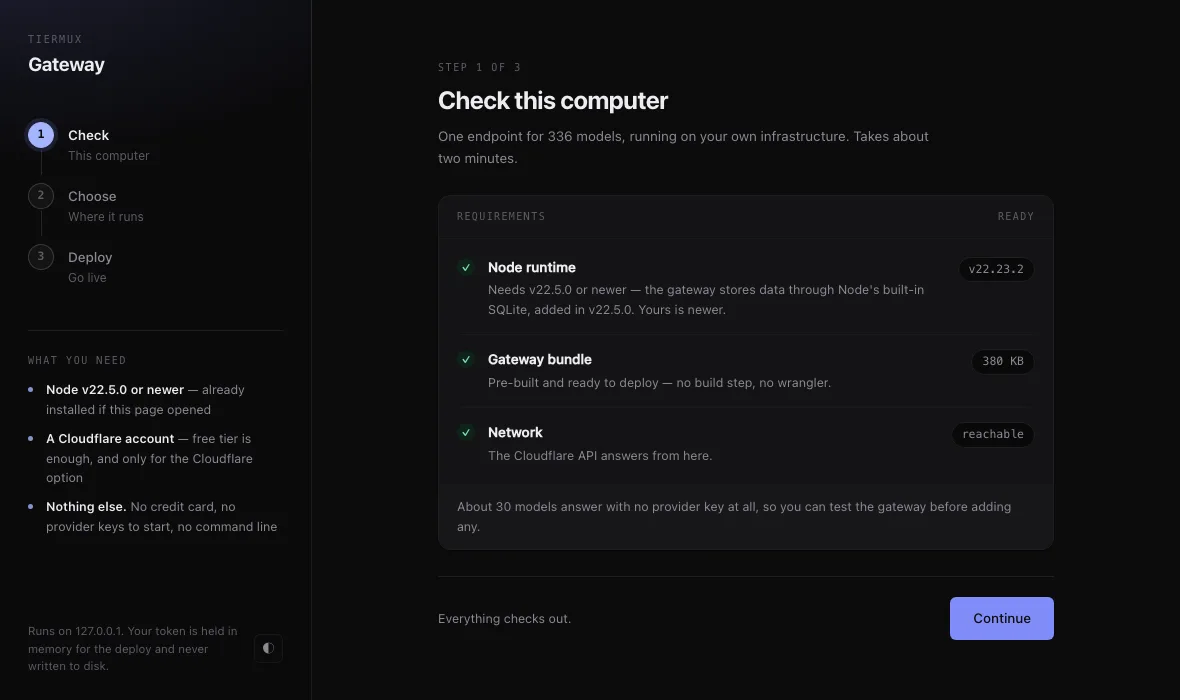
Three requirements, checked for you
- Node v22.5.0 or newer. The gateway stores data through Node's built-in SQLite, which landed in v22.5.0.
- The gateway bundle. Pre-built and ready to deploy — the check reports its size.
- Network. Only needed for the Cloudflare route; it confirms the Cloudflare API answers from here.
Roughly thirty models answer with no provider key at all, so you can test the gateway before adding any.
2 · You choose where it runs#
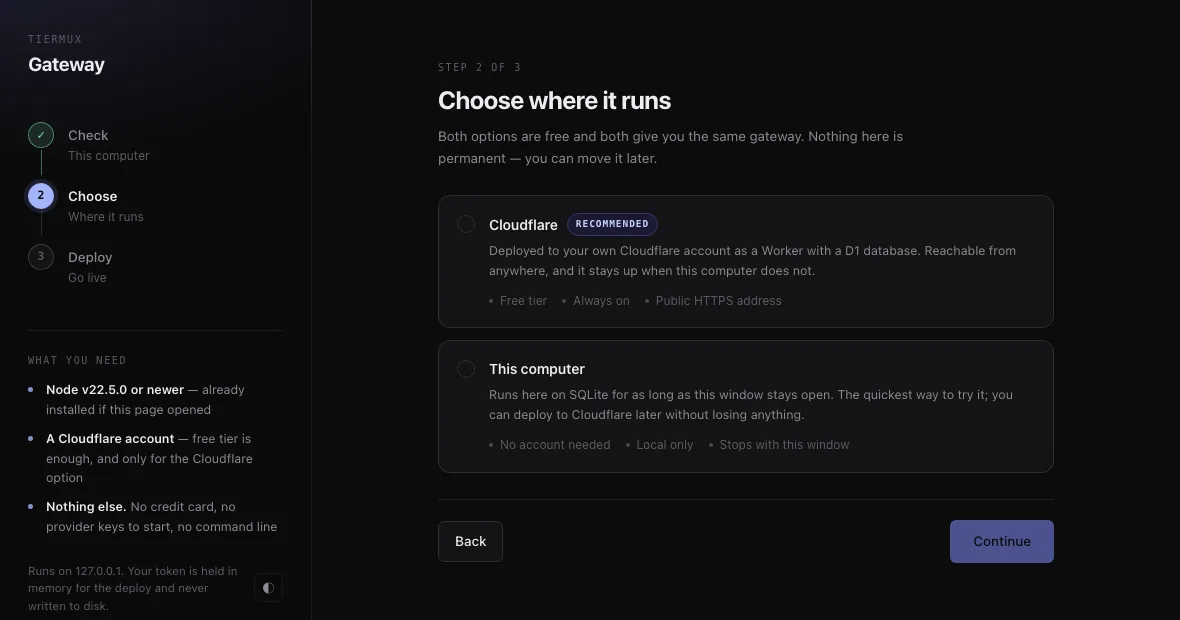
Both are free, and neither is permanent
- Cloudflare — a Worker with a D1 database in your own account. Reachable from anywhere, and it stays up when this computer does not.
- This computer — runs here on SQLite for as long as the window stays open. The quickest way to try it; you can deploy to Cloudflare later without losing anything.
3 · Deploying to Cloudflare#
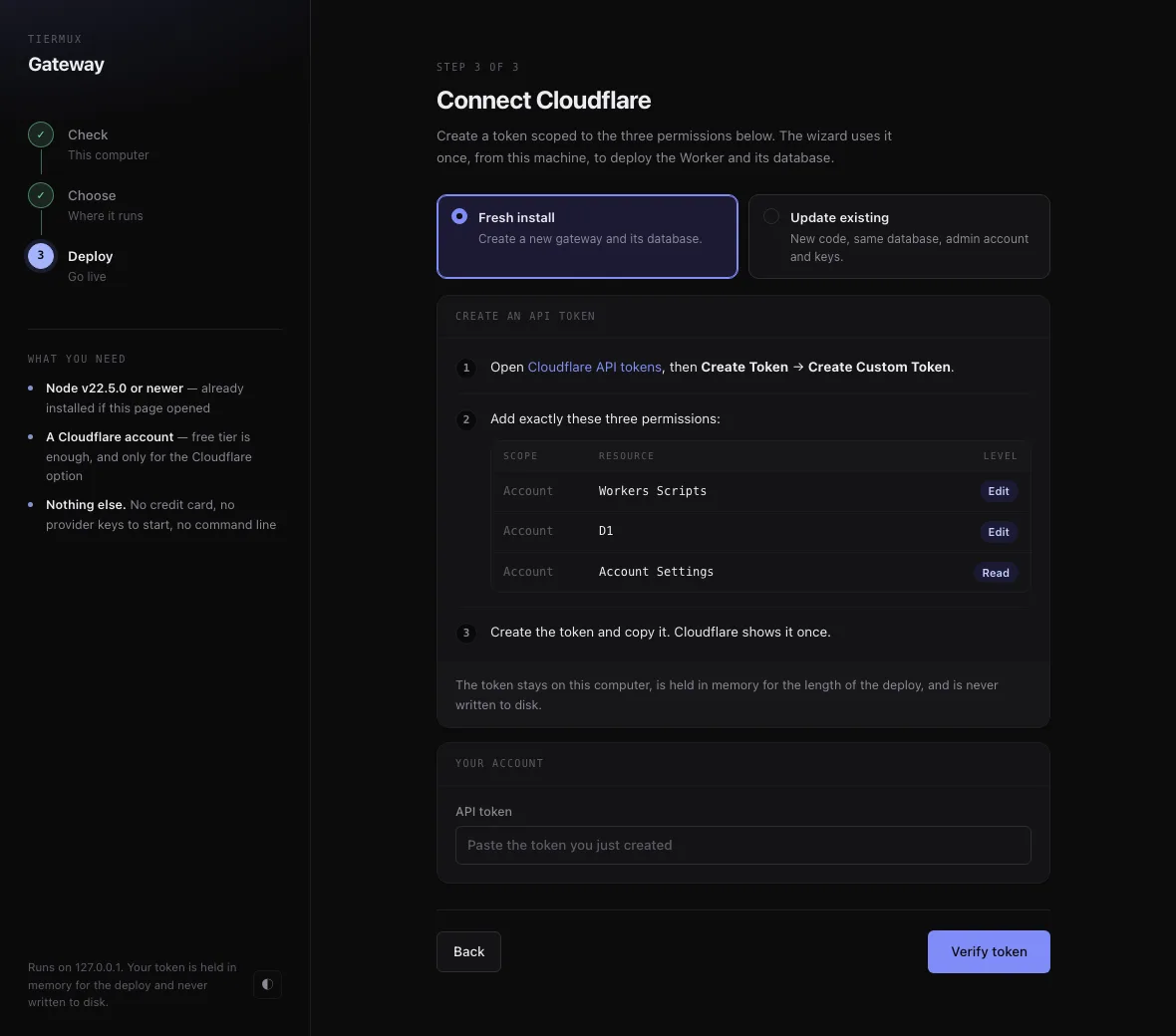
One scoped API token, used once
Open Cloudflare API tokens ↗, then Create Token → Create Custom Token, and add exactly these three permissions:
| Scope | Resource | Level | Why |
|---|---|---|---|
| Account | Workers Scripts | Edit | Uploads the Worker itself. |
| Account | D1 | Edit | Creates the database and binds it. |
| Account | Account Settings | Read | Reads your account list and workers.dev subdomain. |
127.0.0.1 for the same reason — a process holding a Cloudflare token has no business being reachable from the network.Cloudflare shows the token once. Paste it, verify, and the wizard creates the D1 database, uploads the script, and enables the workers.dev URL — with real upload progress rather than a spinner.
Updating an existing gateway#
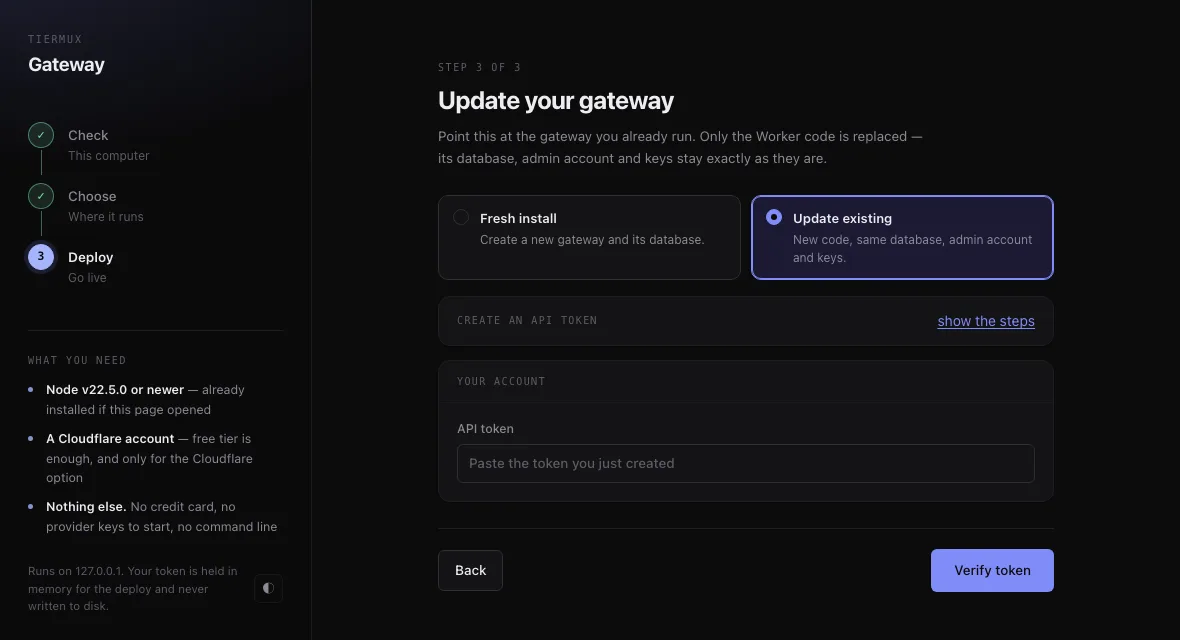
Same three steps, one toggle
On the last step, switch from Fresh install to Update existing. Only the Worker code is replaced — the database, the admin account, your provider keys and every issued API key stay exactly as they are.
The token walkthrough collapses to a show the steps link, because you have already made one; the same token works again.
Updating the other way round#
If you deployed from a fork rather than the wizard, or you run it in Docker, updating is the equivalent action in that world:
| How you deployed | To update | What happens |
|---|---|---|
| Setup wizard | Run it again, pick Update existing | New Worker code uploaded over the old one. Database untouched. |
| Deploy button / fork | GitHub’s Sync fork button | Workers Builds redeploys on the push. Database untouched. |
| Docker | docker compose pull && docker compose up -d | State survives the recreate and every image update. |
| Node | git pull && npm install && npm start | Same database in DATA_DIR. |
Deploying the gateway
Two targets, one source tree, one schema. D1's engine is SQLite, so the schema is genuinely shared — only the driver differs.
The Deploy button forks the repo into
your GitHub, provisions D1, deploys,
and wires up Workers Builds.

Every later push to your fork
auto-deploys.

Needs: a browser and a CF account.
docker compose up -d      # :8788/panel

npm install && npm start   # Node 22.5+

# Built-in node:sqlite — no compile
# step, no Redis, no Postgres.
# Config: PORT and DATA_DIR.
The packaged release ships a pre-built Worker bundle, so deploying needs neither wrangler nor a build step on the far end. State survives docker compose down and every image update.
First run#
- Open
/panel. With no admin yet, you land on/panel/install. - Set an admin username and password. That is the entire form. You are never asked where the catalog lives, because that is not yours to manage — it loads on its own.
- Install locks.
/panel/installstops working, so nobody can claim the account after you. - Add a provider key, then issue an API key.
/v1/*refuses to serve until at least one API key exists. There is no open mode and no default password.
docker compose pull && docker compose up -d. A gateway that holds your provider keys and proxies your traffic must never fetch and run new code on its own.Agents and clients
Everything that has been connected to this gateway, and the three things each one asks for under its own set of names. Seventeen clients, one endpoint.
/v1/messages itself, so its base URL must not end in /v1 — otherwise every call goes to /v1/v1/messages and 404s, which Claude Code then reports as “authentication failed”. Everything else in this table takes the /v1 form.| Client | Protocol | Base URL | Config lives in | Key supplied as |
|---|---|---|---|---|
| Claude Code | Anthropic | https://YOUR-DEPLOYMENT no /v1 | environment | ANTHROPIC_AUTH_TOKEN |
| Codex CLI | Responses | https://YOUR-DEPLOYMENT/v1 | ~/.codex/config.toml | env_key → env var |
| Pi | OpenAI | https://YOUR-DEPLOYMENT/v1 | ~/.pi/agent/models.json | apiKey: "$VAR" |
| Hermes Agent | OpenAI | https://YOUR-DEPLOYMENT/v1 | ~/.hermes/config.yaml | api_key: "${VAR}" |
| Cline | OpenAI | https://YOUR-DEPLOYMENT/v1 | settings UI | API Key field |
| Roo Code | OpenAI | https://YOUR-DEPLOYMENT/v1 | settings UI | API Key field |
| Kilo Code | OpenAI | https://YOUR-DEPLOYMENT/v1 | Providers → Custom provider | API key field |
| Aider | OpenAI | https://YOUR-DEPLOYMENT/v1 | flags or environment | OPENAI_API_KEY |
| Goose | OpenAI | https://YOUR-DEPLOYMENT/v1 | goose configure | prompted |
| OpenHands | OpenAI | https://YOUR-DEPLOYMENT/v1 | Settings → Advanced | API key field |
| Continue | OpenAI | https://YOUR-DEPLOYMENT/v1 | config.yaml | apiKey |
| Open WebUI | OpenAI | https://YOUR-DEPLOYMENT/v1 | Settings → Connections | API key field |
| Zed | OpenAI | https://YOUR-DEPLOYMENT/v1 | settings UI | API key field |
| OpenCode | OpenAI | https://YOUR-DEPLOYMENT/v1 | config file | API key field |
| DeepSeek harness | OpenAI | https://YOUR-DEPLOYMENT/v1 | environment | OPENAI_API_KEY |
| OpenAI SDK | OpenAI | https://YOUR-DEPLOYMENT/v1 | code | api_key= |
| curl | all three | https://YOUR-DEPLOYMENT/v1 / https://YOUR-DEPLOYMENT | — | Authorization: Bearer |
The three values#
Whatever a client calls its fields, it is asking for the same three. Base URL turns up as “API endpoint”, “Custom URL” or “Provider API”; the provider type must be set to OpenAI Compatible before any of them take effect, because every other provider type ignores the URL and calls its own servers.
| Value | What to use | Notes |
|---|---|---|
| Base URL | https://YOUR-DEPLOYMENT/v1 | Claude Code excepted, as above. |
| API key | tmx_… | Issued under Connect in your panel. Shown once; only its hash is stored. |
| Model | auto | Lets the gateway choose. Put a model id from your Models tab here instead to pin one. |
Verifying a connection#
Before blaming the client, check the gateway answers. A 200 with a non-empty list means the URL, the key and the catalog are all good — so anything still broken is on the client's side of the wire.
curl -s -H "Authorization: Bearer tmx_your_key_here" \
  "https://YOUR-DEPLOYMENT/v1/models"
Gateway routing and failure policy
A fixed, deterministic order — and a substitution is always announced, never silent.
- Exact alias — yours, panel-configured, resolves before model names
- Exact
model_id - Normalized key —
deepseek/deepseek-v4:freeanddeepseek-v4collide, which is what makes cross-provider fallback possible - Wildcard match —
deepseek/*style patterns - Configured fallback alias
auto— unknown names land here instead of dead-ending on a 404;x-tiermux-modeland the response body both name what actually ran
Before any of it: requests declaring tools only reach tool-capable models, image-carrying requests only vision-capable ones, and prompts are steered away from models whose context window cannot hold them.
Failure policy#
| Upstream result | What happens |
|---|---|
| 400 · 413 · 415 · 422 | Caller's fault — returned verbatim, never retried. |
| 401 · 403 | That key is parked 15 minutes; the request fails over. |
| 402 · 404 · 405 · 501 | Fail over; the model–provider pair is remembered and skipped next time. |
| 408 · 409 · 425 | Transient — fail over. |
| 429 | That key is parked and the next takes over. Honours Retry-After; a "daily quota gone" body parks the key until midnight UTC. Never opens the circuit. |
| 5xx · 529 | Counts toward two circuits — the provider's (5 consecutive) and that one model's (3). One broken model never takes its provider offline. |
| Stream dies before first token | Falls over. HTTP 200 and headers are not a commitment. |
| Stream dies after first token | Never falls over — switching mid-answer would duplicate generation and re-run tool calls. The failure is reported inside the stream. |
The auto profiles, hedging, quota headroom and recovery windows →
Catalog API
The public data layer both products read. Five GET endpoints, open CORS, no key.
Catalog API — conventions
Five read-only endpoints. All are GET, all are CORS-enabled, and none of them takes an API key.
https://tiermux.mainulislam3057.workers.dev
Authentication#
None. There is no key to obtain and no header to send. Every response carries Access-Control-Allow-Origin: * and Access-Control-Allow-Methods: GET, so browser code can call these endpoints directly with no proxy.
Caching and versioning#
The four catalog endpoints answer with Cache-Control: public, max-age=120. /api/service-status answers no-store, because a stale kill-switch read is worse than an extra request.
Every catalog response carries three fields at the top level:
| Field | Type | Meaning |
|---|---|---|
| version | string | Catalog schema version, e.g. "1.6". Key your client's cache on this — a change means the shape may have moved. |
| last_updated | string | Date of the last catalog revision, YYYY-MM-DD — the newest change to any provider, model or announcement the response was built from. Currently "…". |
| last_synced_at | string | null | When the catalog was last verified against the providers, ISO 8601 UTC. The sync runs every five minutes; a value older than about fifteen minutes means it is stalled. Currently "…". |
Filtering#
Two query parameters exist across the API. Unknown parameters are ignored rather than rejected.
| Parameter | Type | Accepted by |
|---|---|---|
| tag | string | /models and /catalog. One of frontier, strong, mid, small, unknown — the tier every model carries. A tag that matches nothing returns an empty list, not an error. |
| provider | string | /models only. A provider_id such as google. |
enabled is always true in these responses — it is there for clients that also read an operator export, where it is not./modelsflat listEvery enabled model as a flat list, each entry joined with its provider. The endpoint most clients want.
curl -s "https://tiermux.mainulislam3057.workers.dev/models?tag=reasoner&provider=google"
Response
{
  "version": "1.6",
  "last_updated": "…",
  "last_synced_at": "…",
  "count": 9,
  "models": [
    {
      "model_id": "gemini-2.5-flash",
      "display_name": "Gemini 2.5 Flash",
      "enabled": true,
      "context_window": 1000000,
      "capabilities": { "tools": true, "vision": true, "reasoning": true },
      "tags": ["mid"],
      "limits": { "rpm": 15, "rpd": 1500 },
      "pricing": { "free": true, "input": 0.3, "output": 2.5 },
      "recommended": false,
      "provider_id": "google",
      "provider_display_name": "Google"
    }
  ]
}
| Field | Type | Notes |
|---|---|---|
| count | number | Length of models after filtering, not the size of the catalog. |
| models[] | Model[] | See the object reference. On this endpoint only, each entry also carries provider_id and provider_display_name. |
/providersdirectoryThe provider directory with a model count per provider, and no model bodies. Use it to build a picker without downloading the whole catalog.
{
  "version": "1.6",
  "last_updated": "…",
  "last_synced_at": "…",
  "count": 34,
  "providers": [
    {
      "provider_id": "google",
      "display_name": "Google",
      "base_url": "https://generativelanguage.googleapis.com/v1beta",
      "keyless": false,
      "key_url": "https://aistudio.google.com/apikey",
      "enabled": true,
      "model_count": 10
    }
  ]
}
key_url and docs_url are only present when set. Read them with a presence check, not a truthiness check on an assumed key./catalogeverythingProviders with their models nested, plus announcements, in one request. This is the payload shape the gateway consumes.
{
  "version": "1.6",
  "last_updated": "…",
  "last_synced_at": "…",
  "announcements": [ { "id": 7, "title": "…", "details": "…" } ],
  "providers": [
    {
      "provider_id": "groq",
      "display_name": "Groq",
      "base_url": "https://api.groq.com/openai/v1",
      "keyless": false,
      "key_url": "https://console.groq.com/keys",
      "enabled": true,
      "models": [ { "model_id": "…", "capabilities": { … } } ]
    }
  ]
}
With ?tag=, models are filtered first and providers left with no matching model are dropped entirely — so the response never contains an empty models array you have to skip over.
/models if you are going to flatten this anyway — it is a smaller response and already carries the provider name on each entry./announcementsfeedOperator announcements: new providers, newly verified free tiers, removals, and product updates such as the gateway launch.
{
  "version": "1.6",
  "last_updated": "…",
  "last_synced_at": "…",
  "count": 3,
  "announcements": [
    { "id": 1, "title": "New provider verified", "details": "Plain text, newlines preserved." }
  ]
}
details is plain text, not HTML or markdown. Render it in a <pre> or escape it — the rendered feed at the bottom of this page does exactly that.
/api/service-statuskill switchThe cheapest possible read, carrying no catalog data. This is the endpoint automated clients should poll.
{ "service_enabled": "1", "last_synced_at": "…" }
The value is the string "1" or "0", not a boolean. When it reports "0", the four catalog endpoints answer 503 until the operator flips it back. last_synced_at is the same field the catalog endpoints carry, so a client can watch for a stalled sync from this one cheap read.
Object reference
The two objects that appear across the API.
Model#
| Field | Type | Description |
|---|---|---|
| model_id | string | The id to send to the provider, verbatim. Unique only within a provider — the same id on two providers is two catalog entries. |
| display_name | string | Human label. Fall back to model_id if you need a guaranteed non-empty string. |
| enabled | boolean | Always true in public responses; disabled models are filtered out before serving. |
| context_window | number | Tokens, as verified. May be 0 or null when the provider never disclosed one and probing was inconclusive. |
| capabilities.tools | boolean | Tool/function calling works. Measured with a real call. |
| capabilities.vision | boolean | Accepts image input. |
| capabilities.reasoning | boolean | Emits reasoning output. |
| tags[] | string[] | Exactly one entry: the model's capability tier — frontier, strong, mid, small, or unknown when the id could not be resolved. The band is measured capability, so it is independent of parameter count and of pricing. Capabilities themselves are never tags; read capabilities.* instead. |
| limits.rpm | number | Requests per minute per key. null when the provider publishes none. |
| limits.rpd | number | Requests per day per key. Same nullability. |
| pricing.free | boolean | Callable at no cost on this provider's free tier. |
| pricing.input | number | USD per million input tokens. null when unpriced. |
| pricing.output | number | USD per million output tokens. |
| recommended | boolean | Operator's pick among comparable entries. A ranking hint, not a capability. |
| provider_id | string | /models only The owning provider. |
| provider_display_name | string | /models only That provider's label. |
pricing.free: true is not the same as "0.00 in, 0.00 out". Some providers list a zero price on a model that answers 429 requires_purchase until an account is funded. The free flag is set from what a real call returned, so trust the flag over the numbers.Provider#
| Field | Type | Description |
|---|---|---|
| provider_id | string | Stable id — the value the provider query parameter takes. |
| display_name | string | Human label. |
| base_url | string | API root. Empty string when the provider is reached some other way. |
| keyless | boolean | Answers with no key and no account. |
| key_url | string | optional Where a free key is issued. Absent when there is nothing to link to. |
| docs_url | string | optional The provider's own API docs. |
| enabled | boolean | Always true in public responses. |
| model_count | number | /providers only Enabled models on this provider. |
| models[] | Model[] | /catalog only Nested models, without the two provider fields — you already know the provider. |
comments column on a provider is deliberately not in any public response. It holds maintenance notes that may name accounts or internal decisions.Errors and status codes
Every error is JSON with a single error string. There are no error codes to switch on — the HTTP status is the contract.
| Status | Body | When, and what to do |
|---|---|---|
| 200 | the payload | Normal. An empty models or providers array is a 200, not a 404 — a filter that matches nothing is not an error. |
| 404 | {"error":"Not found"} | Unknown path — and also a known path with a method other than GET, because routes match on method and path together, so POST /models is a 404 rather than a 405. Check for a typo before assuming an outage; there are only five public endpoints. |
| 503 | {"error":"Service is currently paused. Try again later."} | The operator kill switch is off. Sent no-store. Keep serving your last good catalog and re-check /api/service-status on a slow timer. |
| 500 | {"error":"…"} | Unexpected. Retry once with backoff; if it persists, it is worth reporting. |
async function loadCatalog(previous) {
  try {
    const res = await fetch(BASE + "/models");
    // 503 means paused, not broken: keep whatever you had.
    if (res.status === 503) return previous;
    if (!res.ok) throw new Error("HTTP " + res.status);
    const data = await res.json();
    // A malformed body must not replace a good catalog either.
    if (!Array.isArray(data.models)) throw new Error("bad shape");
    return data;
  } catch (err) {
    return previous;
  }
}
Rate limits#
There is no per-client rate limit on these endpoints and no 429. The 120-second cache is what protects the service, which is also why a tighter poll buys you nothing.
The limits on a model are a different thing entirely: those are the upstream provider's limits, per key, and they are the numbers your own client has to respect.
Directory
The live catalog, rendered from the same API this page documents.
Model directory
The complete model directory, generated live from the catalog on page load. Capability badges are measured per model: T tool calling, V image input, R reasoning output.
| Model | Provider | Context | Capabilities | Price |
|---|---|---|---|---|
| Loading the catalog… | ||||
Provider directory
Every provider in the catalog, with its endpoint and key information. Keyless providers need no account; the others issue free API keys through their own portals — the get a key ↗ link goes straight there.
| Provider | Endpoint | Access | Models |
|---|---|---|---|
| Loading the catalog… | |||
Reference
Operator announcements and the questions that come up most.
Announcements
Catalog and product updates from the operator, newest first. The same feed is available as JSON at /announcements.
FAQ
Is there a rate limit on the catalog API?
No per-client limit and no 429. Responses are cached for 120 seconds, so polling faster than that reads the same bytes. Five minutes is a sensible cadence; the catalog itself re-syncs every five minutes.
Can I call this from a browser?
Yes. Every response sends Access-Control-Allow-Origin: *, so no proxy is needed. The page you are reading does exactly that — the directories above were fetched client-side.
A model in the catalog returned 429 immediately. Is the data wrong?
Probably not. limits.rpm and limits.rpd are per key, and a free tier's real headroom moves — a promotion can appear and vanish inside a day.
The catalog records what a real call returned at verification time. If a listing has genuinely stopped answering it gets removed on the next sync rather than cached; the fastest fix on your side is a second key, or a second provider.
Can I run my own catalog?
Yes, and both products support it. Point tiermux.catalog.url at your own deployment for the extension, or set the TIERMUX_CONFIG_URL deployment variable for the gateway. Serve the /catalog shape documented above and both will consume it.
Does the extension send anything to TierMux?
It fetches the catalog from this site. That is the only request in its direction, and it carries no identity, no prompt and no usage.
Inference goes VS Code → provider, directly. Keys live in VS Code's encrypted secret storage; chats are JSON files on your own disk. The gateway keeps the same rule on your infrastructure.
Why is the same model listed several times?
Because a model on two providers has two context windows, two rate limits and two prices — and on a given day one of them works while the other does not. Keeping them as separate entries is what makes cross-provider failover possible; collapsing them would throw away the only field that matters when one goes down.